Evaluating the Finazze Business Landing Page PSD Figma Template for Professional Services
For professionals in business consulting, legal services, financial advising, and wellness coaching, establishing a credible digital presence is often the first step toward acquiring new clients. The decision to build a website from scratch versus utilizing a pre-designed template involves weighing time, cost, and design quality. The Finazze Business Landing Page PSD Figma represents a specific category of resource designed to streamline this process. It offers a dual-format solution—providing both Figma source files and Photoshop (PSD) assets—that allows designers and developers to rapidly deploy a modern, responsive site tailored to service-based industries.
This article examines the utility, structure, and practical application of the Finazze template. By analyzing its features, comparing it against alternative development approaches, and identifying the scenarios where it provides the most value, readers can determine if this tool aligns with their project requirements.
Understanding the Core Structure and Design Philosophy
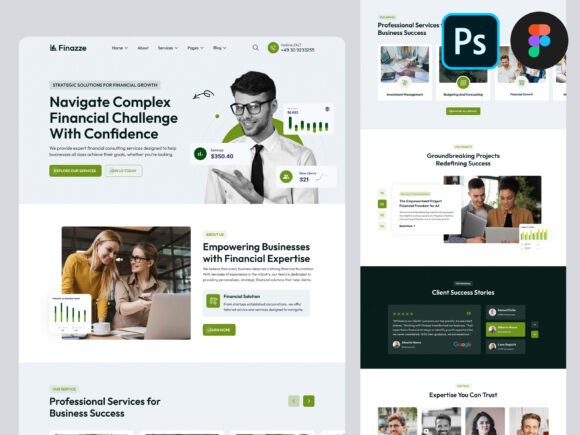
The Finazze Business Landing Page PSD Figma is built around a minimalist, modern aesthetic that prioritizes clarity and professionalism. Unlike generic templates that attempt to serve every niche simultaneously, Finazze is specifically curated for high-trust sectors such as law firms, insurance brokerage, investment consulting, and life coaching. The design philosophy relies on clean lines, ample whitespace, and a structured layout that guides the user's eye toward key conversion points, such as contact forms or service descriptions.
A defining characteristic of this template is its adherence to established web standards. It utilizes a Bootstrap grid system with a 1170px container width, ensuring that the layout remains consistent across different screen sizes while maintaining a full-width canvas of 1600px for desktop views. This approach guarantees that the final product looks polished on tablets and mobile devices without requiring extensive media query adjustments during the coding phase.
The inclusion of predefined web elements significantly reduces the initial workload. Instead of designing buttons, navigation bars, and hero sections from zero, users access a library of components that are already styled and aligned. These elements are fully vector-based, meaning they can be scaled indefinitely without losing resolution. For agencies or freelancers who need to deliver high-quality work quickly, this balance between customization and pre-built efficiency is a critical factor.
Comparing Dual-Format Availability: Figma vs. PSD
One of the most distinct advantages of the Finazze Business Landing Page PSD Figma package is the provision of two separate file formats. In the current landscape of web design, the choice between Figma and Adobe Photoshop often dictates the workflow of the entire team. Understanding how these formats function within this template helps clarify its versatility.
Figma Integration: Figma has become the industry standard for collaborative interface design. The Figma version of Finazze leverages the platform's robust component system and style libraries. This means that colors, typography, and spacing rules are centralized. If a designer needs to change the primary brand color for a client, they can update the global style in Figma, and it will propagate across all artboards instantly. The well-organized layers and named groups make it easy to navigate complex layouts, reducing the time spent searching for specific elements.
Photoshop (PSD) Utility: While Figma dominates UI/UX workflows, many traditional graphic designers and print specialists still rely heavily on Photoshop. The inclusion of a fully layered PSD file ensures that the template remains accessible to teams that have not transitioned entirely to cloud-based tools. The PSD maintains the same level of organization, with named layers and grouped elements, allowing for pixel-perfect manipulation of raster images and vector shapes within the Adobe ecosystem.
The Tradeoff: The primary tradeoff here is not about quality but rather workflow compatibility. A team using only Webflow or WordPress page builders might find the Figma file more immediately useful for prototyping before hand-off to developers. Conversely, a team deeply embedded in the Adobe Creative Cloud suite may prefer the PSD for its advanced image manipulation capabilities. Having both options eliminates the need for third-party conversion tools, which often introduce errors or layer corruption.
Assessing Customization and Scalability
When evaluating a template like Finazze, the degree of customizability is paramount. A rigid template forces a brand to conform to the design, whereas a flexible one adapts to the brand. The Finazze Business Landing Page PSD Figma is marketed as 100% customizable, and the technical structure supports this claim.
The use of free Google Fonts ensures that there are no licensing hurdles when changing typography to match a client's brand guidelines. Furthermore, the vector icons included in the package allow for recoloring and reshaping without degradation. This is particularly important for industries like advertising consulting or wellness coaching, where visual identity plays a massive role in brand perception.
However, customization does require a baseline of design proficiency. While the template provides the skeleton, the user must understand how to manipulate layers, grids, and styles effectively. It is not a "drag-and-drop" website builder; it is a design asset intended for professionals who will eventually convert the design into code or use it as a precise blueprint for a developer. Users expecting a turnkey solution that publishes directly to a live server without any technical intervention may find this format less suitable than a hosted theme.
Industry Fit and Use Case Analysis
The versatility of the Finazze Business Landing Page PSD Figma extends across several professional service sectors. Its clean, authoritative design language makes it particularly effective for roles that require trust and expertise.
- Business Consulting and Financial Advisors: The structured layout conveys stability and competence. Sections for case studies, testimonials, and service breakdowns are clearly defined, helping these professionals articulate their value proposition efficiently.
- Legal Services: Lawyers require a website that projects seriousness and reliability. The minimal design avoids unnecessary distractions, focusing the visitor's attention on practice areas and contact information.
- Insurance Brokers and Investment Consultants: These fields benefit from the template's ability to handle data-heavy content without appearing cluttered. The grid system allows for clear presentation of plans, rates, or market insights.
- Life Coaches and Wellness Experts: While these industries often lean towards warmer aesthetics, the modern UI of Finazze can be adapted by adjusting the color palette and imagery. The focus on typography and whitespace creates a sense of calm and clarity, which aligns well with wellness branding.
In contrast, highly e-commerce-focused businesses or portfolio sites for avant-garde artists might find the template too conventional. The design prioritizes information architecture over experimental visuals, making it less ideal for brands seeking a disruptive or highly artistic online presence.
Decision Factors: When to Choose Finazze vs. Alternatives
Determining whether the Finazze Business Landing Page PSD Figma is the right resource depends on the specific constraints and goals of the project. Several factors should guide this decision.
Choose Finazze if:
- You need a professional starting point that adheres to modern UI best practices.
- Your team requires flexibility in choosing between Figma and Photoshop workflows.
- You are building a site for a service-based industry where credibility and clarity are the primary objectives.
- You want to save time on the initial layout and grid setup, allowing you to focus on content and branding.
- You plan to hand off the design to a developer who prefers working from organized vector files.
Consider Alternatives if:
- You require a fully functional, coded website that can be uploaded immediately without a development phase.
- Your budget does not allow for a designer or developer to interpret the Figma/PSD files into a live site.
- You need complex backend functionality integrated directly into the design file, which is beyond the scope of a static template.
- Your brand identity is highly unconventional and would clash with the template's inherent structure.
Practical Implementation and Workflow Efficiency
Implementing the Finazze Business Landing Page PSD Figma typically follows a streamlined workflow. Once the files are downloaded, the designer opens the preferred format. Because the layers are named and grouped properly, locating specific sections—such as the footer, hero banner, or service cards—is intuitive. The "Easy to Find Artboards" feature mentioned in the documentation translates to real-world time savings, preventing the frustration often associated with poorly organized template files.
The reliance on the Bootstrap grid system serves as a bridge between design and development. Developers familiar with Bootstrap can translate the visual layout into HTML and CSS with greater accuracy, knowing that the spacing and alignment in the design file mirror the underlying code structure. This alignment reduces the gap between the mockup and the final product, minimizing revision cycles.
Furthermore, the inclusion of amazing vector illustrations adds a layer of polish that stock photos sometimes lack. These illustrations can be customized to reflect specific industry scenarios, adding a unique touch to the site without the cost of commissioning original artwork.
Conclusion on Value and Suitability
The Finazze Business Landing Page PSD Figma occupies a strategic niche for professionals and agencies looking to balance speed with design integrity. It is not merely a collection of graphics but a comprehensive toolkit that addresses the common pain points of web design: organization, responsiveness, and adaptability. By offering both Figma and PSD files, it accommodates diverse technical environments, ensuring that the resource remains relevant regardless of the software stack a team employs.
While it requires some technical skill to implement effectively, the return on investment comes in the form of reduced design time and a higher quality end product. For business consultants, lawyers, financial advisors, and coaches aiming to establish a strong digital footprint, this template provides a solid foundation. However, users must weigh their own technical capabilities and project timelines against the need for a raw design asset versus a ready-made solution. Ultimately, the choice hinges on whether the priority is immediate deployment or a tailored, professional-grade design process.