Disability Service Website Design Figma: A Comprehensive Evaluation for Professional Services
In the digital landscape, accessibility is no longer an optional feature; it is a fundamental requirement for ethical and legal compliance. For professionals offering business consulting, legal advice, financial planning, or wellness coaching, the website serves as the primary interface for client acquisition and trust-building. The Disability Service Website Design Figma template emerges as a specialized resource designed to address these critical needs while providing a robust framework for various service-based industries. This evaluation explores what makes this design distinct, how it compares to generic alternatives, and when it represents the most strategic choice for your digital presence.
Defining the Scope and Distinctive Features
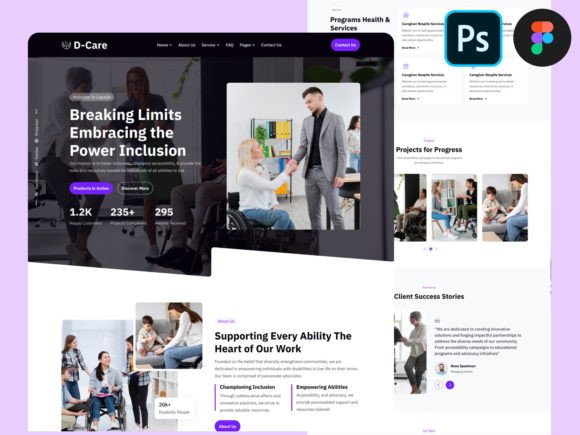
The Disability Service Website Design Figma is more than a collection of visual assets; it is a structured system built within the Figma environment that prioritizes inclusivity without sacrificing aesthetic appeal. Unlike standard templates that often treat accessibility as an afterthought, this design integrates accessible principles directly into its layout logic. It includes predefined web elements that streamline the development process, allowing designers and developers to build a site that adheres to modern UI standards while remaining fully functional for users with diverse abilities.
What sets this template apart is its dual focus on visual modernity and structural rigidity. It offers a full-width 1600px canvas based on the Bootstrap Grid System, ensuring that the layout remains responsive across tablets and mobile devices. The design incorporates vector icons, creative illustrations, and free Google Fonts, all organized into well-named layers and groups. This level of organization is crucial for scalability, as it reduces the time required to customize the site for specific niches such as insurance brokerage, investment consulting, or life coaching. The inclusion of both Figma and PSD files further extends its utility, catering to teams that may utilize different software stacks during the prototyping and handoff phases.
Core Components for Professional Adaptation
While the name suggests a focus on disability services, the underlying architecture is versatile enough to support a wide array of professional sectors. The template features unique artboards that can be easily adapted for:
- Business Consulting: Highlighting case studies and service offerings with clear, high-contrast typography.
- Legal and Financial Services: Structuring complex information hierarchies for clarity and trust.
- Wellness and Life Coaching: Utilizing calming color palettes and accessible navigation for user comfort.
- Advertising and Investment: Leveraging bold visual elements to capture attention while maintaining readability.
The ability to switch between these contexts without rebuilding the grid from scratch is a significant efficiency gain. The use of Figma styles and components ensures that global changes—such as updating a primary color or adjusting font sizes for better legibility—propagate instantly throughout the design.
Comparative Analysis: Specialized vs. Generic Templates
When evaluating design resources, it is essential to compare specialized options like the Disability Service Website Design Figma against generic multipurpose templates. Generic templates are ubiquitous and often come with hundreds of pre-built pages covering every imaginable industry. However, they frequently lack depth in specific areas, particularly regarding accessibility standards. Users often find themselves spending excessive time retrofitting these designs to meet WCAG (Web Content Accessibility Guidelines) requirements, which can lead to inconsistent results.
In contrast, the Disability Service Website Design Figma starts with accessibility as a foundational element. This means that contrast ratios, focus states, and semantic structure are already considered in the initial design phase. While a generic template might offer more variety in terms of "looks," it often lacks the "feel" of an inclusive experience. For businesses where trust and reliability are paramount—such as law firms or financial advisors—the subtle cues of an accessible design can significantly enhance user confidence.
Another point of comparison lies in the customization workflow. Many free or low-cost templates suffer from poor layer organization, making them difficult to modify. The Disability Service Website Design Figma addresses this by ensuring all layers are named and grouped properly. This distinction becomes critical when working with larger teams or when handing off designs to developers who need to translate the Figma file into code using frameworks like Bootstrap or Grid 1170px. The trade-off here is that specialized templates may have fewer "out-of-the-box" page variations compared to massive marketplace bundles, but the quality and adaptability of each included artboard are typically superior.
Strengths, Tradeoffs, and Decision Factors
To make an informed decision, one must weigh the strengths of this template against potential limitations. The primary strength is its adherence to best practices in web development. By basing the layout on a 1600px full-width format and utilizing a proven grid system, it minimizes the risk of layout breakage on different screen sizes. The inclusion of vector graphics ensures that images remain crisp on high-resolution displays, a detail often overlooked in lower-quality templates.
However, there are tradeoffs to consider. Because the design is rooted in a specific aesthetic—minimal and modern—it may require significant effort to adapt if a brand's identity leans heavily towards ornate, vintage, or highly stylized visuals. While the template is 100% customizable, transforming a clean, accessible layout into something radically different can sometimes feel like fighting against the grain of the original design intent. Additionally, reliance on Figma requires the user to have access to the platform and a basic understanding of its interface. Teams accustomed solely to Adobe Photoshop might find the transition to Figma components and auto-layout features to have a learning curve, although the provided PSD file mitigates this issue partially.
Decision factors should also include the target audience's technical proficiency. If you are a solo entrepreneur looking for a quick drop-in solution with zero design knowledge, a drag-and-drop website builder might seem easier initially. However, those builders often lock you into their ecosystem and limit long-term customization. The Disability Service Website Design Figma empowers you to own the design process, offering full control over the final output, which is vital for businesses that plan to scale or rebrand in the future.
When Is This Template the Right Choice?
This resource is the ideal choice for organizations and professionals who prioritize inclusivity and want to ensure their digital presence is welcoming to all users. It is particularly well-suited for:
- Service Providers in Regulated Industries: Lawyers, financial advisors, and insurance brokers who face strict compliance requirements will benefit from the built-in accessibility features.
- Agencies Seeking Efficiency: Web design agencies can use this template as a starting point to deliver high-quality, accessible sites to clients faster, reducing the time spent on foundational layout work.
- Brands Valuing Modern Minimalism: Companies whose brand identity aligns with clean lines, ample whitespace, and clear typography will find the design language naturally fits their needs.
- Projects Requiring Cross-Platform Consistency: Since the template is optimized for mobile and tablet, it is perfect for businesses where a significant portion of traffic comes from non-desktop devices.
Limitations and Alternative Approaches
Despite its strengths, the Disability Service Website Design Figma may not be the right fit for every scenario. If a project requires a highly interactive, animation-heavy experience that goes beyond standard scrolling and navigation, this template might serve only as a partial foundation. Similarly, if a business operates in a niche that demands a very specific, unconventional visual style—such as a punk-rock music venue or a luxury fashion house—the minimal modern design might feel too restrained without extensive modification.
In such cases, alternative approaches might include commissioning a custom design from scratch or selecting a template specifically tailored to that niche. Custom design offers unlimited creative freedom but comes with a higher cost and longer timeline. Niche-specific templates might offer more relevant imagery and layouts out of the box but could lack the rigorous accessibility focus found in this template. The key is to evaluate whether the core value proposition of the template—accessibility combined with a professional service layout—aligns with your primary business goals.
Practical Implementation and Workflow
Implementing the Disability Service Website Design Figma involves a straightforward workflow that leverages its organizational strengths. Upon downloading the file, users receive one Figma file and one PSD file, allowing for flexibility in the design phase. The process typically begins by exploring the well-organized folders and components. Because the layers are named and grouped properly, locating specific elements like headers, footers, or call-to-action buttons is intuitive.
Designers can then begin customizing the content to fit their specific service, whether it is advertising consulting or wellness coaching. The use of Figma styles allows for rapid iteration of colors and typography. Once the design is finalized, the handoff to development is streamlined due to the template's basis in the Bootstrap Grid System. Developers can reference the 1170px grid guidelines to ensure the coded version matches the design fidelity. This alignment between design and development reduces friction and helps maintain the integrity of the accessible features throughout the coding process.
Ultimately, choosing a design template is about balancing immediate needs with long-term sustainability. The Disability Service Website Design Figma offers a compelling balance of specialized functionality and broad applicability. It provides a solid foundation for professionals who understand that a great website is not just about how it looks, but how well it works for everyone. By investing in a design that respects accessibility standards from the outset, businesses can create a more inclusive, trustworthy, and effective online presence that serves their clients for years to come.